ANDREA LAB / BLOG
Pre-signed URLs in Amazon S3: When to use them and when to consider alternatives?
When developing web applications that require cloud file management, one of the most common challenges is deciding on the right architecture for upload and download operations. The fundamental question is: should files go through our backend, or should we allow clients to interact directly with cloud storage? Amazon S3's Presigned URLs offer a compelling solution to this dilemma, enabling secure, direct access to S3 objects without routing traffic through your servers.
File management in modern web applications is a fundamental task for numerous use cases: document storage, evidence uploads, multimedia project management, directory synchronization, and more. Amazon S3 (Simple Storage Service) has established itself as a robust, scalable, and cost-effective solution for object storage, and a very common integration pattern is the use of Presigned URLs.
This article delves into what presigned URLs are, how they work, when it is convenient to use them (in most cases), and when it might be justified to route traffic through the backend instead of using these signed URLs.
What is a Presigned URL?
A Presigned URL is a temporary link generated by the server (or any authenticated client) that allows direct access to an object in an S3 bucket without exposing AWS credentials. These URLs can grant temporary permissions to:
- Download an object.
- Upload (PUT) an object.
- Generate upload forms (POST policies). Presigned URLs are signed using the associated AWS credentials and have a limited validity that prevents unauthorized access.
The URL is typically structured as follows:
https://{bucket-name}.s3.{region}.amazonaws.com/{object-key}
?X-Amz-Algorithm=AWS4-HMAC-SHA256
&X-Amz-Credential={access-key}%2F{date}%2F{region}%2Fs3%2Faws4_request
&X-Amz-Date={timestamp}
&X-Amz-Expires={expiration-time}
&X-Amz-SignedHeaders=host&X-Amz-Signature={signature}
Where:
{bucket-name}: The name of the S3 bucket.{region}: The AWS region where the bucket is located.{object-key}: The key (path) of the object within the bucket.{access-key}: The AWS access key ID used to sign the URL.{date}: The date the URL was signed.{timestamp}: The timestamp when the URL was generated.{expiration-time}: The duration in seconds for which the URL is valid.{signature}: The cryptographic signature ensuring the URL's authenticity.
How do they work?
When your backend (or an authorized client) requests a signed URL from AWS, it contains the following information:
- The path of the object (or future object).
- The expiration date.
- The allowed method (GET, PUT, or POST).
- A digital signature generated with AWS Signature v4.
S3 validates this token upon receiving the request. If the signature matches and is not expired, access is granted.
Example workflow:
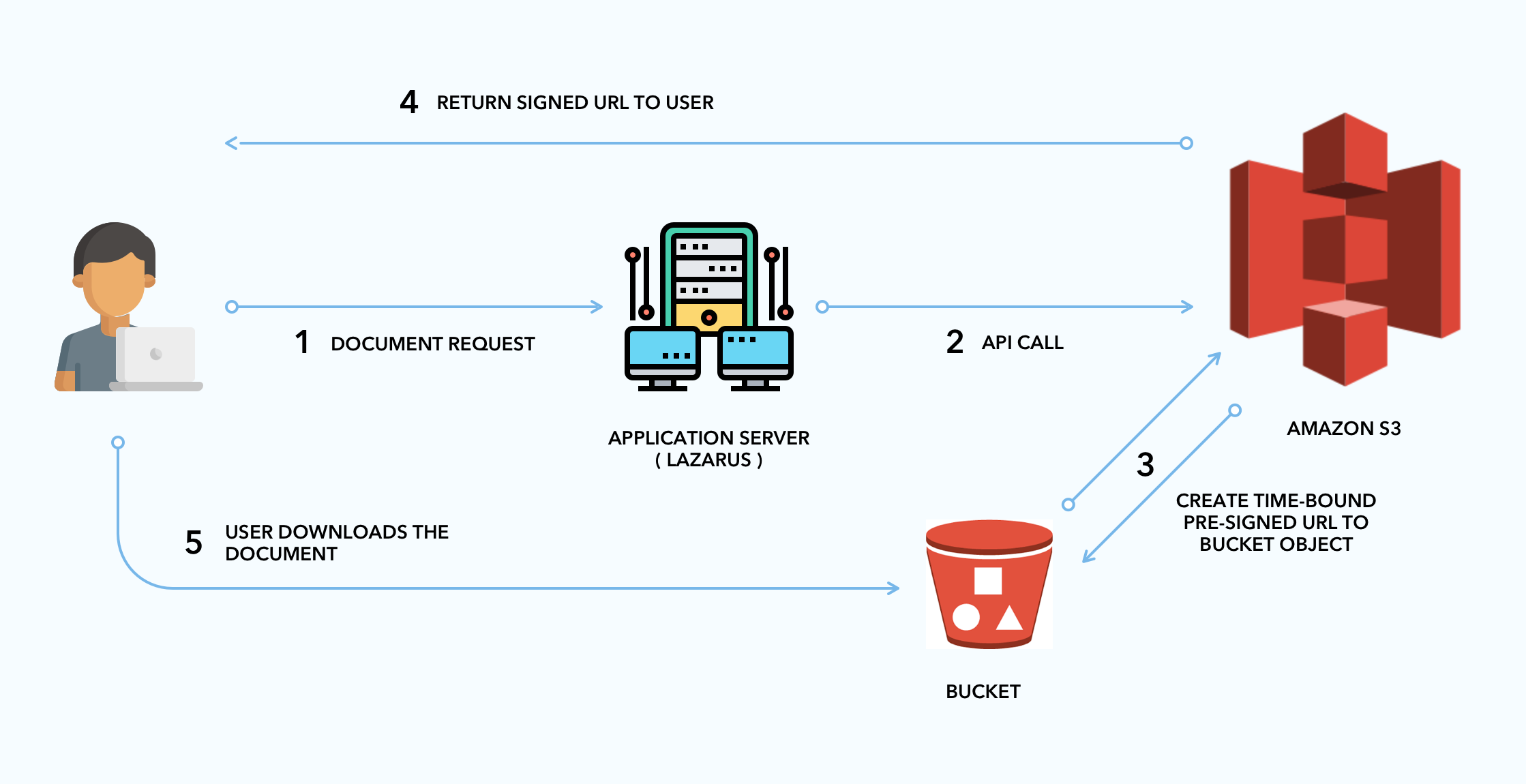
Source: Halodoc Blog
Benefits of Presigned URLs
Presigned URLs offer a number of decisive advantages in terms of architectural design and system efficiency.
1. Reduction of load on the backend
One of the most significant benefits of using pre-signed URLs is the substantial reduction of load on the application's backend server. Without this mechanism, a file transfer requires a costly "double hop": the data must first travel from the client → backend server, and then the backend server must forward the data to S3 (backend → S3). This process consumes CPU resources on the server for handling the large data stream, incurs potential transfer costs for the traffic passing through the backend, increases latency due to the extra intermediate step, and creates a risk of bottlenecks on the server if multiple large transfers happen simultaneously.
By contrast, a pre-signed URL allows the file to travel directly from the client → S3, effectively avoiding the backend server for the data transfer itself. The backend only needs to generate the simple, temporary URL, offloading the heavy data transfer work entirely to Amazon S3.
2. Better user experience
Pre-signed URLs greatly enhance the user experience by facilitating the implementation of precise file transfer progress tracking. When the client is uploading directly to S3 using the pre-signed URL, front-end technologies like XMLHttpRequest, fetch, or libraries such as axios can directly report the upload progress. This enables developers to provide users with accurate, real-time feedback through progress bars or status indicators.
For example, a common implementation might look like this:
const upload = axios.put(presignedUrl, file, {
  onUploadProgress: (e) => {
    const progress = Math.round((e.loaded * 100) / e.total);
    console.log(progress);
  },
});
This capability is essential for modern applications, as users expect transparency and feedback during lengthy file operations.
3. Security without exposing credentials
Pre-signed URLs are a robust solution for granting temporary, secure access to S3 objects without ever exposing sensitive AWS credentials to the client. The backend server, which holds the necessary AWS Access Key and Secret Key, uses them only to generate the time-limited URL. The client receives only this URL, which contains a signature proving the user's authorization for a specific action (read or write) on a specific object for a fixed duration. Once the expiration time is reached, the URL becomes invalid, maintaining a high level of security and adhering to the principle of least privilege.
4. Simplicity in file synchronization logic
This mechanism is ideal for applications that require complex file synchronization between the client and a centralized storage, as it simplifies the overall logic. By allowing the client to push or pull data directly, the architecture naturally supports the core functionality of applications like: Web file explorers, large media repositories, and modern tools resembling Drive, Dropbox, or OneDrive.
Furthermore, this direct access is equally beneficial for cross-platform desktop applications built with frameworks like Electron or Tauri that need to manage local data synchronization efficiently with the cloud.
Ideal cases to use Presigned URLs
Below is a table with scenarios where you should use presigned URLs.
| Use case | Should use Presigned URL? | Justification |
|---|---|---|
| Downloading stored files | Yes | Avoids backend stress and reduces latency. |
| Uploading small, medium, or large files | Yes | Allows native progress bar. |
| Web file explorers | Yes | Backend only lists metadata, does not transfer bytes. |
| Mobile apps uploading images/videos | Yes | Saves battery and bandwidth. |
| Drive-like synchronization | Yes | Enables a distributed and efficient architecture. |
| Serverless backend architecture | Yes | Avoids Lambda costs for transfer. |
When NOT to use Presigned URLs?
Although they are powerful, there are circumstances where it might be preferable to route traffic through your backend.
1. When you need to process or validate the file before saving
One of the primary reasons to avoid direct S3 uploads is the necessity of processing or validating the file content immediately upon reception and before it is permanently stored. When a file bypasses the server, your backend loses the immediate control needed to perform essential checks.
Examples of such critical pre-storage steps include antivirus scanning, strict structural validation for data formats (such as checking the schema of JSON, XML, or CSV files), or specialized image processing (like generating thumbnails, applying compression, or extracting/modifying metadata). Similarly, documents like PDFs may require sanitization to remove malicious or sensitive elements.
In these scenarios, the necessary data flow is non-negotiable: Client → Backend → Processing → S3. The server must act as an intermediary to inspect and modify the content before committing it to permanent storage.
2. When the file must remain completely hidden from the client
Another compelling reason to avoid pre-signed URLs is when the file must remain completely hidden from the client, and even temporary, time-limited direct access is unacceptable. Highly sensitive content, such as private proprietary models or medical records, often falls under strict regulatory or security requirements.
Although pre-signed URLs expire, they still imply exposing a direct, albeit temporary, endpoint to the client. By routing the entire download through your server, the backend can enforce access control at the application layer on every single request, potentially adding extra layers of authentication, logging, and audit trails that are not intrinsically part of the S3 URL mechanism. This ensures that the data's location is never directly revealed, enhancing the overall security posture for extremely confidential assets.
3. When you want to strictly control speed or size
Finally, routing traffic through the backend may be necessary when you need to maintain strict, granular control over transfer parameters that are dependent on application logic.
For instance, if you require extreme rate limiting that is tied to a user's subscription tier, or if the permissible file size must depend on dynamic internal logic (e.g., storage quota remaining, project-specific limits), it is simpler and safer to enforce these rules on the server. The backend can check these complex constraints before accepting the data stream.
While S3 can enforce simple limits on size and speed via IAM policies or S3 features, the flexibility of application-layer control on the backend often provides the precise, custom-tailored enforcement required for sophisticated applications.
Table of when NOT to use Presigned URLs
| Situation | Should use Presigned URL? | Alternative |
|---|---|---|
| Validate files before saving | No | Backend intermediary |
| Custom encryption | No | Controlled upload |
| High risk of leakage | Depends | Backend-controlled access |
| Advanced auditing policies | Depends | Backend proxy |
Basic implementation: Generation of Presigned URLs
Example in Node.js (AWS SDK v3)
import { S3Client, PutObjectCommand } from "@aws-sdk/client-s3";
import { getSignedUrl } from "@aws-sdk/s3-request-presigner";

const client = new S3Client({ region: "us-east-1" });

export async function generateUploadUrl(filename) {
  const command = new PutObjectCommand({
    Bucket: "my-bucket",
    Key: filename,
    ContentType: "application/octet-stream",
  });

  return await getSignedUrl(client, command, { expiresIn: 3600 }); // 1 hour
}
Example for downloads
import { GetObjectCommand } from "@aws-sdk/client-s3";

export async function generateDownloadUrl(key) {
  const command = new GetObjectCommand({
    Bucket: "my-bucket",
    Key: key,
  });

  return await getSignedUrl(client, command, { expiresIn: 600 });
}
General advantages and disadvantages
Summary table:
| Method | Advantages | Disadvantages |
|---|---|---|
| Presigned URL | Less load, faster, secure, granular control | Does not allow prior processing |
| Intermediary backend | Full control, complete auditing | Higher cost, higher latency |
Best practices
When incorporating pre-signed URLs into your architecture, adhering to several key best practices is crucial for maximizing both security and performance.
Maintain short expiration times
A fundamental security practice is to ensure that pre-signed URLs are valid only for the absolute minimum time required for the intended operation. Typically, an expiration window of 1 to 30 minutes is recommended. The expiration time defines the window during which anyone possessing the URL can perform the designated action (upload or download).
By setting a short expiry, you significantly limit the exposure window if the URL were ever intercepted or accidentally shared. Once the time limit is reached, the URL becomes instantly invalid, forcing the client to request a new, authenticated URL from the backend for any further access.
Avoid Predictable Keys and Paths
When generating the S3 key (the file path and name) for objects accessed via pre-signed URLs, you should avoid predictable or easily guessable naming conventions. If an attacker can easily deduce the names or patterns of other files in the bucket, they might attempt to generate or guess URLs for unauthorized resources.
While the pre-signed URL mechanism provides security, it's a good practice to use unique identifiers or random components in the S3 key structure to add a layer of defense-in-depth, making it impossible to traverse the bucket structure simply by modifying the URL path.
Strictly Limit Allowed Methods and Permissions
The power of a pre-signed URL lies in its ability to grant temporary access for a specific, minimal action. Therefore, you must strictly limit the allowed HTTP methods (e.g., use PUT for uploads and GET for downloads, but never DELETE unless absolutely necessary) and ensure the IAM role used by the backend to generate the URLs adheres to the principle of least privilege. This means the role should only possess the specific permissions needed (e.g., s3:PutObject or s3:GetObject) and should ideally be restricted to a narrow set of prefixes or objects within the S3 bucket.
Delegating permissions with minimal roles ensures that even if the backend system were compromised, the potential damage is contained.
Log Audits in the Backend Before Generation
Before your backend service successfully generates and returns a pre-signed URL to a client, it is a critical security and compliance practice to log a full audit record of the event. This log should capture details such as the user who requested the URL, the S3 key of the object being accessed, the type of operation (upload/download), and the exact expiration time.
Generating an audit log before the transfer happens creates a clear, undeniable record of authorization, which is invaluable for security monitoring, debugging, and meeting compliance requirements, providing visibility into who was granted access to specific resources and when.
Conclusion
Presigned URLs are a fundamental tool when working with AWS S3. They allow you to build efficient, fast, and scalable applications without compromising security. They are the ideal choice in most cases, especially when there is no need to process files before storage.
However, the intermediary backend remains relevant when there is a strict need for control, validation, or content transformation.
Ultimately: the best architecture is one that balances efficiency and control according to your application's requirements.